
When you track a parcel online, you may see updates such as “In Transit,” “Out for Delivery,” or “Delivery Attempted.” Understanding your courier delivery status helps you know what is happening to your shipment and whether you need to take any action.
Courier companies use different tracking terms, but most updates describe similar stages of the delivery process. This guide explains common courier tracking statuses, their meanings, and what to do if your parcel is delayed.
What Is Courier Delivery Status?
Courier delivery status is an update that shows the latest recorded stage of a shipment. It helps customers understand whether a parcel has been booked, collected, transported, reached a local delivery facility, or delivered.
You can usually check your delivery status using the tracking number provided by the seller or courier company.
The information available depends on the courier's tracking system. Some platforms show detailed shipment movements, while others provide only a few major updates.
Common Courier Delivery Statuses and Their Meanings
1. Order Confirmed
The seller has confirmed your order. However, this does not necessarily mean the parcel has been handed over to the courier.
What to do: Check the expected dispatch date if the shipment has not yet been sent.
2. Shipment Information Received
The courier has received electronic shipment details from the sender. The parcel may still be waiting for pickup.
What to do: Wait for the first physical scan or pickup confirmation.
3. Picked Up
The courier has collected the package from the seller or sender.
What to do: Keep your tracking number and check for the next transit update.
4. In Transit
Your parcel is moving through the courier network. It may travel between sorting centres, regional hubs, and destination facilities.
What to do: Continue checking the tracking page. A parcel may remain in this status until its next scan.
5. Arrived at Sorting Facility
The shipment has reached a facility where parcels are sorted and directed toward their next destination.
What to do: No action is normally required unless the shipment remains delayed beyond the expected delivery timeframe.
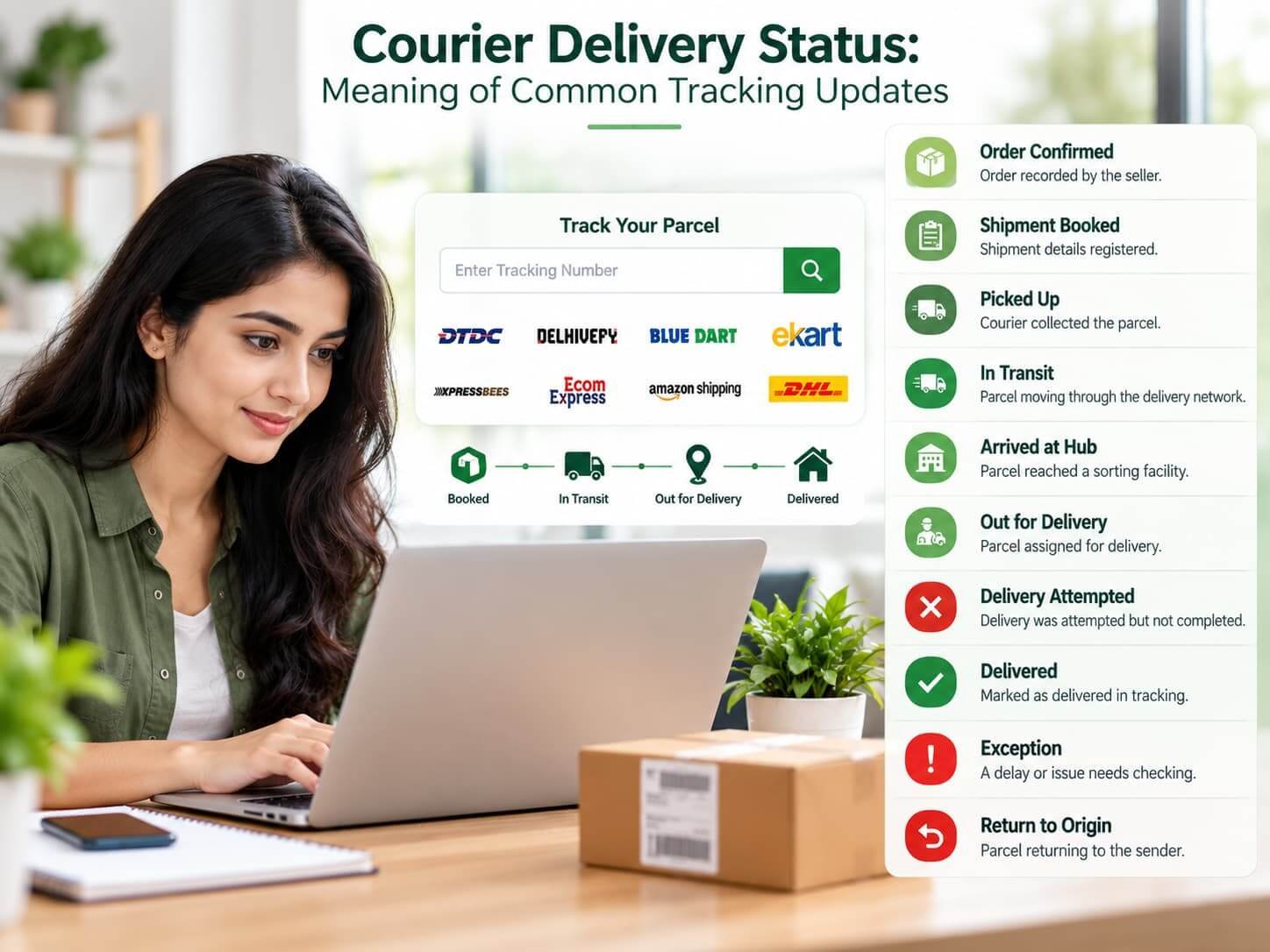
6. Out for Delivery
The parcel has been assigned to a delivery route, usually for an attempt that day.
What to do: Keep your phone available and make sure the delivery address and contact details are correct. Delivery on the same day is not guaranteed in every case.
7. Delivery Attempted
The courier attempted delivery but could not complete it. Possible reasons include an unavailable recipient, access problems, or difficulty locating the address.
What to do: Read the detailed tracking update and follow the courier's instructions for rescheduling or collection.
8. Delivery Rescheduled
The delivery has been moved to another date or delivery round.
What to do: Check the revised estimate and contact the courier if you need clarification.
9. Delayed or Shipment Exception
An unexpected issue is affecting the shipment. This may involve operational delays, weather, address problems, or other circumstances.
What to do: Check the latest scan details. Contact the courier or seller if the delay continues or the tracking page requests action.
10. Delivered
The courier has marked the parcel as delivered.
What to do: Check your delivery location, reception desk, household members, or any delivery confirmation provided. If you cannot locate the parcel, contact the courier promptly.
11. Return to Sender
The parcel is being returned to the sender. This can happen after unsuccessful delivery attempts, an address issue, or another shipment problem.
What to do: Contact the seller or courier to understand the reason and ask about the available options.
How to Check Your Courier Delivery Status Online
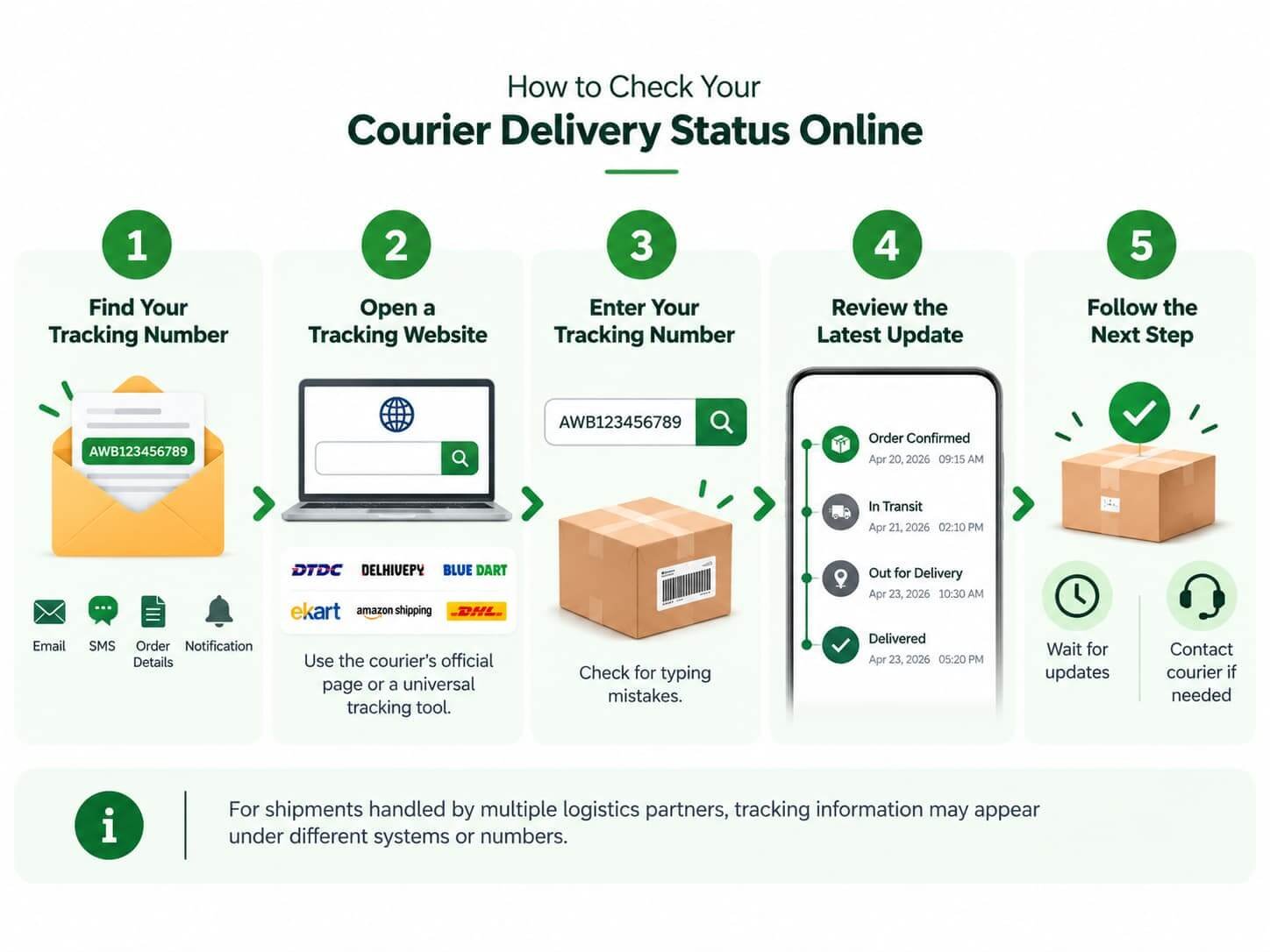
Follow these steps to check your parcel's progress.
- Find your tracking number: Look in your dispatch email, SMS, order details, or courier notification.
- Open a tracking website: Use the courier's official tracking page or a universal parcel tracking tool that supports your carrier.
- Enter your tracking number: Check for typing mistakes or unnecessary spaces.
- Review the latest update: Read the status and the timestamp of the latest scan.
- Follow the next step: Wait for normal transit updates or contact the courier if the status indicates a problem.
For shipments handled by multiple logistics partners, tracking information may appear under different systems or numbers.
Why Is My Courier Delivery Status Not Updating?
A tracking status may remain unchanged for several reasons.
1. The Parcel Has Not Been Scanned
A shipment may be travelling between facilities or waiting for its next scan. Not every movement produces an immediate online update.
2. The Courier System Is Delayed
Tracking information may take time to appear on the website or app.
3. The Shipment Is Between Sorting Centres
A parcel can travel for some time before reaching the next facility where its barcode is scanned.
4. The Tracking Number Is Incorrect
An incorrect number may return no results or display information for another shipment. Verify it against the original notification.
5.The Parcel Is Delayed
Operational issues, weather, customs checks, or address problems may affect delivery timing.
What should you do? Check the courier's official tracking page first. If the shipment has exceeded its expected delivery window or the status requests action, contact the courier or seller with your tracking number.
What Does “Out for Delivery” Mean?
“Out for Delivery” generally means the parcel has been assigned to a local delivery route. It is often the final major tracking stage before delivery.
However, it does not guarantee that the package will arrive that day. Delivery may be postponed because of route capacity, access issues, unsuccessful contact, or other operational circumstances.
If the parcel is not delivered as expected, check for a new tracking update before contacting customer support.
What Should You Do If Your Parcel Shows “Delivered” but Has Not Arrived?

If your tracking page says “Delivered” but you have not received the parcel, take these steps:
- Check the entrance, mailbox, reception desk, or designated safe place.
- Ask household members, neighbours, or building security whether they accepted it.
- Review any delivery photo, signature, or proof of delivery available.
- Confirm that the shipping address is correct.
- Contact the courier and seller to report the missing parcel.
Keep your order details and tracking number available when raising the issue.
Frequently Asked Questions
1. How can I check my courier delivery status?
Enter your shipment tracking number on the courier's official website or a compatible universal parcel tracking platform.
2. What does “In Transit” mean in courier tracking?
It means the parcel is moving through the delivery network. It may be travelling between facilities or awaiting its next scan.
3. Does “Out for Delivery” mean my parcel will arrive today?
Usually, it indicates that the parcel has been assigned to a delivery route. However, delays or unsuccessful delivery attempts can change the expected arrival time.